

A Hinge conversation starter gives the other person something clear to respond to. A photo can suggest a question about a place; a prompt answer can reveal an interest or opinion. Choose the detail you actually want to discuss.
Comment on a photo or a prompt answer
On Hinge, you can attach a comment to a Like. After a match, you can continue chatting. If you already sent a question with your Like, follow that thread instead of introducing yourself again.
For a hiking photo, try: “That trail looks beautiful. Would you recommend it for a first visit?” You are asking about the place without assuming they climb mountains every weekend. For a prompt about learning guitar: “What song are you determined to get right?”
When the profile gives you little to work with
Ask a small question that leaves them a choice: “Have you watched anything recently that you would actually recommend?” If you have a recommendation of your own, share it when they answer. You do not need to tease them about having a sparse profile.
Use a profile screenshot in Charmlet
Upload the profile screenshot to Charmlet, review the details it extracted, and choose what to talk about. A useful instruction is: “Ask about the guitar prompt in one short message. I am a beginner too.” Include that last detail only if it is true for you.
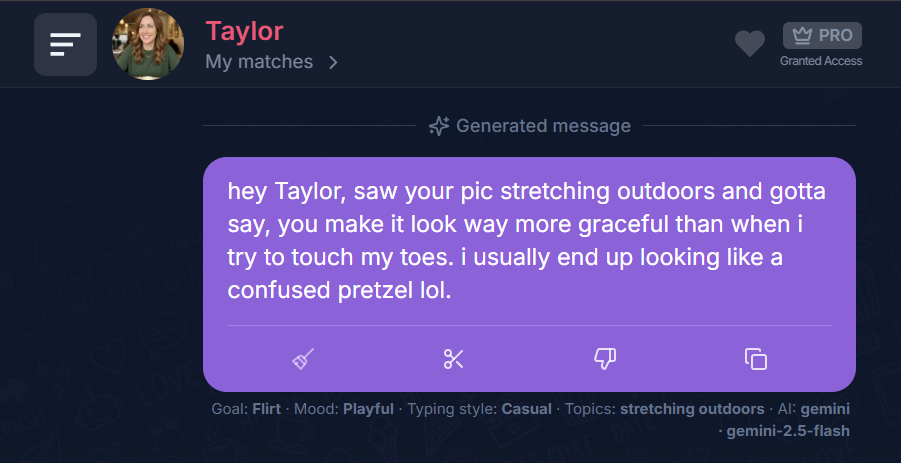
The screenshot below shows a message drafted in Charmlet from a profile detail. Check the reference and tone before copying a suggestion into your own chat.
A worked example: choose the approach that fits
A good way to begin is to choose the part of the profile you could genuinely discuss for another few messages. That may be a small detail rather than the most impressive one. You do not need to prove you read everything; you need to open one coherent thread.
The situation
Fictional example for illustration. The messages below are editorial examples, not live AI output or real user conversations.
Their prompt says they are learning to make fresh pasta. You enjoy cooking, but have only used dried pasta so far.
Three approaches to consider
Choose the approach that fits your intentions. Replace personal details with your own; these are alternatives, not a sequence to send.
1. Curious
What was harder: getting the dough right or finding somewhere to hang all the pasta?
This asks about the process instead of awarding a generic compliment.
2. Honest connection
I cook a lot but have never made pasta from scratch. What convinced you to try it?
It shares your starting point without inventing expertise.
3. Playful
Are you at the beautiful-ravioli stage or the flour-on-every-surface stage?
The humor is about a relatable activity, not a joke at their expense.
Choose a detail with room to grow
Before sending, imagine two answers they might give. If both leave you with nothing except another unrelated question, choose a richer detail. An activity often gives you a process, a reason and a story to discuss.
Follow their answer, not your plan
If they say the pasta was a disaster, talk about that experience. If they explain why they started, follow the motivation. You do not have to steer every opening toward an invitation within a fixed number of messages.
What to avoid
Do not claim you make fresh pasta too just because it makes an opening easier. A truthful difference gives you more to discuss than a fabricated match.
From a Hinge comment to an actual conversation
Profile answer: “The best part of my week is rehearsing with a very enthusiastic amateur band.” You do not need to be a musician to respond.
You: “What song gets everyone playing louder than they intended?”
Them: “Anything from the 2000s. We all think we are the lead singer.”
You: “That sounds like a band with five frontpeople. I would happily be the audience for a nostalgic set.”
You reacted to the answer and added your own taste. If they ask what you would request, name something you enjoy. If they say they only rehearse privately, keep talking about music rather than treating your joke as an invitation.
Related reading
Dating on Instagram: how to start a DM · Why your matches aren't responding · How to keep a conversation going